

Adopt an omnichannel AI assistant platform to automate routine support, cut first response time, and run 24/7 coverage without adding headcount. Chirps is the recommended starting point: it deploys in days using a no-code agent canvas, connects directly to your CRM and e-commerce stack, and handles voice, chat, and messaging from a single orchestration layer. Teams that pilot on order status or FAQ deflection report 60–80% automated resolution rates for common queries. Here is what to do right now:
- Pick one or two high-volume use cases (order status, FAQ deflection, or appointment scheduling) and scope a pilot lasting several weeks.
- Set baseline KPIs before you launch: first response time (FRT), deflection rate, CSAT, and cost per ticket.
- Connect your CRM on day one so the AI agent has customer context and avoids stale, generic replies.
- Measure weekly during the pilot, then decide whether to scale or adjust the knowledge base.
Table of Contents
- What does “AI for customer support” actually mean?
- What business benefits can you realistically expect?
- Which use cases deliver the most value first?
- Agent assist or autonomous agents: which one fits your situation?
- How does AI fit into your existing support architecture?
- How do you implement AI support, and how long does it take?
- How do you measure success and calculate ROI?
- What security, privacy, and governance controls do you need?
- How do vendors price AI support platforms, and what should you budget for?
- What separates successful AI support rollouts from failed pilots?
- How Chirps deploys AI assistants: a real-world example
- Key Takeaways
- The part most teams get wrong about AI support
- Chirps gives you a faster path from pilot to production
- Useful sources
What does “AI for customer support” actually mean?
The phrase covers a spectrum of technologies, and conflating them leads to misaligned expectations between product, ops, and finance teams.
Natural language understanding (NLU) and natural language processing (NLP) are the foundation. They let a system parse what a customer typed or said and extract intent and entities (“I want to return my order” → intent: return; entity: order ID). Machine learning (ML) layers on top, improving classification accuracy over time as the model sees more real interactions. Generative models (large language models, or LLMs) go further: they draft a coherent reply, not just a template lookup. Retrieval-augmented generation (RAG) combines an LLM with a live knowledge base so the agent answers from your actual documentation rather than hallucinating. Multimodal agents handle text, voice, and images in the same conversation flow.
The distinction that matters most operationally is agent assist vs. autonomous virtual agents:
- Agent assist sits alongside a human agent, surfacing suggested replies, next-best actions, and real-time coaching prompts. The human still sends every message. It reduces handle time and improves accuracy without removing the human from the loop.
- Autonomous virtual agents resolve the interaction end-to-end without human involvement. They handle order status lookups, password resets, appointment bookings, and FAQ answers at any hour with no agent present.
A practical example of each: an agent-assist tool flags that a customer’s tone is frustrated and suggests a discount offer before the human replies. An autonomous agent, by contrast, checks the order management system, confirms a shipment delay, and proactively sends a new delivery estimate, all without a human touching the ticket.
What business benefits can you realistically expect?
The case for AI in customer service is not theoretical. Platforms that resolve routine queries automatically report 60–80% automated resolution rates for common query types like FAQs, order status, and basic troubleshooting. That single metric reshapes the economics of a support team.
The core benefits break down like this:
- Faster first response: an autonomous agent replies in seconds, not minutes or hours, regardless of queue depth.
- Higher deflection and self-service: a well-tuned bot handles the repetitive majority so human agents focus on complex, high-value interactions.
- Improved agent productivity: agent-assist tools that surface suggested replies and coaching prompts measurably reduce handle time and the cognitive load of context-switching.
- Personalization at scale: with CRM integration, the agent greets customers by name, references their order history, and tailors responses without a human doing the lookup.
- 24/7 coverage: no shift scheduling, no overtime, no coverage gaps on holidays.
The less obvious gains matter too. AI-generated conversation logs give you a structured data set to analyze: you can spot emerging complaint trends, identify knowledge-base gaps, and onboard new human agents faster using real interaction examples. Teams that deploy AI support tools also report lower agent burnout because the bot absorbs the high-volume, low-complexity work that drains energy.
Which use cases deliver the most value first?
Not every workflow is worth automating in the first pilot. The highest-impact, lowest-risk starting points share two traits: they are high-volume and they follow a predictable, bounded script.
Ticket triage and auto-tagging is the easiest win. Auto-triage and sentiment-based prioritization reduce manual ticket handling and route issues to the right team without a human reading every subject line. This alone cuts average resolution time.

Knowledge-base automation (FAQ deflection) is the second. If your top questions account for a large portion of ticket volume, a well-connected bot can deflect many of them before they ever reach an agent.
Live chat bots for order and account management are the natural next step: order status, return initiation, subscription changes. These are transactional, verifiable against your order system, and safe to automate.
Voice and IVR automation handles inbound phone calls: the bot collects intent and account info, resolves what it can, and transfers to a human with full context already populated. This is a strong pilot candidate for businesses where phone volume is high.
Proactive outreach flips the model: the AI sends a shipping delay alert or appointment reminder before the customer calls. It deflects tickets that would have happened.
Agent coaching sits at the other end of the spectrum. It is lower urgency for a first pilot but high value at scale: real-time prompts during live conversations improve quality scores without additional training sessions.
For a pilot, start with FAQ deflection or order status. Both are high-volume, low-risk, and produce measurable deflection rates within weeks. Voice automation and proactive outreach are better suited to a second phase once the knowledge base is clean and integrations are stable.
Agent assist or autonomous agents: which one fits your situation?
The answer depends on the specific workflow, not a blanket policy. Use this checklist:
- Customer impact if wrong: high-stakes errors (billing disputes, medical inquiries, legal matters) warrant human review. Low-stakes errors (wrong FAQ answer) are recoverable.
- Transactional complexity: a single-step lookup (order status) is safe to automate fully. A multi-step workflow with exceptions (partial refund plus account credit) needs human judgment or a tightly constrained decision tree.
- Regulatory sensitivity: HIPAA-covered data, financial account changes, and identity verification steps should keep a human in the loop or use a tightly audited autonomous flow.
- SLA risk: if a misrouted ticket breaches a contractual SLA, the cost of an error is high. Add a confidence threshold: if the agent’s confidence score falls below a set level, escalate automatically.
- Volume: if a workflow runs thousands of times a day and errors are low-stakes, full automation pays off quickly.
A safe handoff flow looks like this: the AI agent detects the intent, attempts resolution, and monitors its own confidence. If confidence drops below threshold, or the customer expresses frustration, the system escalates to a human agent and passes the full conversation context, not just the last message. The human picks up mid-conversation without asking the customer to repeat themselves. After resolution, the system logs the outcome and flags it for review if the bot failed.
Risk controls that belong in every deployment: confidence thresholds on every intent classifier, human review sampling of a percentage of automated resolutions, audit logs for every action the agent takes on a customer account, and a clear escalation path that is never more than one step away.
How does AI fit into your existing support architecture?
Think of the architecture in three layers. The channel layer is where customers reach you: web chat, mobile app, voice, email, and SMS. Each channel feeds into a single orchestration layer, which is the AI agent itself. The orchestration layer routes intent, manages conversation state, and calls the backend connectors it needs to resolve the query.
The connectors that matter most:
- CRM (Salesforce, HubSpot, or similar): customer identity, history, and segment data.
- Helpdesk (Zendesk, Freshdesk, or similar): ticket creation, status updates, and escalation routing.
- E-commerce or order management system: order status, returns, and inventory.
- Knowledge base: the source of truth for FAQ and policy answers.
- Identity and authentication: for account-level actions, the agent needs to verify who it is talking to.
- Telephony and IVR: for voice channels, a SIP trunk or telephony API connects the AI to your phone system.
- Telemetry and logging: every conversation event should flow to an analytics layer so you can measure accuracy, deflection, and CSAT.
The single biggest architecture mistake is building the AI agent without a single customer view. If the CRM and the order system hold different customer records, the agent will give stale or contradictory answers. Resolve data hygiene before you build, not after.
Context retention across channels is the second common gap. A customer who starts on web chat and calls back ten minutes later should not have to repeat their issue. The orchestration layer needs to persist conversation state and link it to the customer record.

Chirps handles this integration layer natively, with direct connectors to CRM and e-commerce platforms and a unified agent canvas that manages context across voice and chat channels.
How do you implement AI support, and how long does it take?
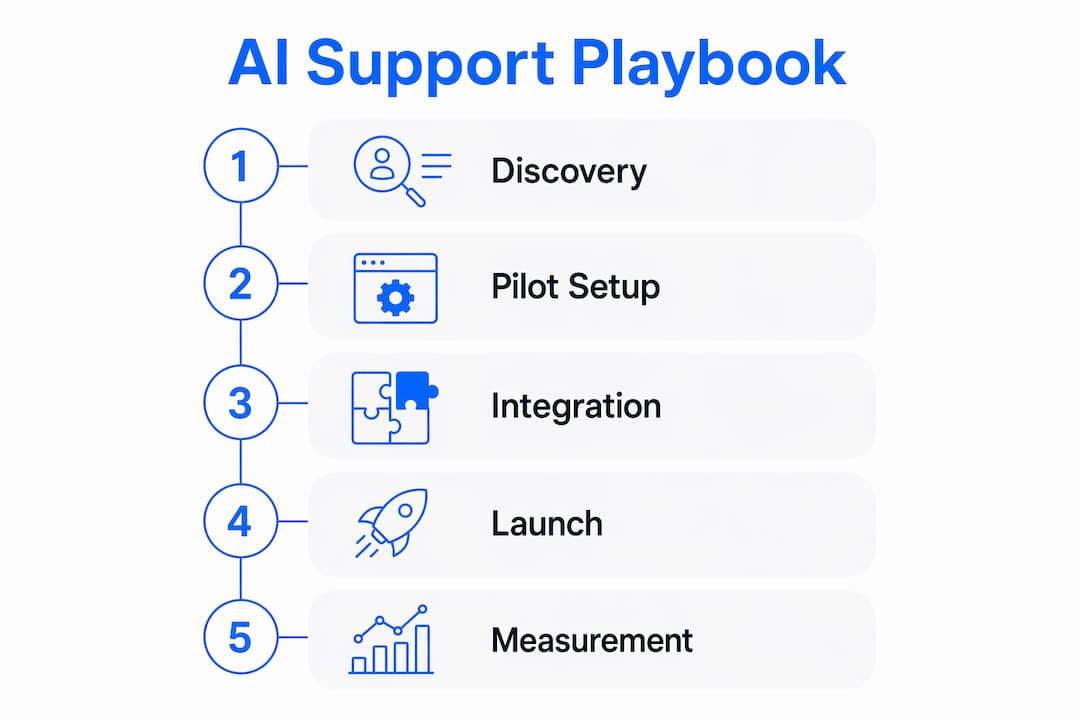
The implementation path has five phases. The timeline below is realistic for a no-code pilot; custom-built enterprise deployments take longer.
| Phase | Key activities | Typical duration |
|---|---|---|
| Discovery | Map top use cases, audit KB, set baseline KPIs | 1–2 weeks |
| Data and KB prep | Clean knowledge base, tag intents, define escalation rules | 1–2 weeks |
| Pilot build | Configure agent in no-code canvas, connect CRM and helpdesk | 2–5 days |
| Pilot run | Live traffic on one use case, weekly KPI reviews | 4–8 weeks |
| Scale | Add use cases, channels, and integrations iteratively | 2–6 months |
No-code, drag-and-drop canvases reduce the pilot build to days rather than months, which is the single biggest shift in how support teams approach AI adoption. You do not need an engineering sprint to prove value.
The implementation checklist:
- Define the pilot use case and success criteria before touching any tooling.
- Audit and clean the knowledge base. Outdated or contradictory articles are the most common cause of poor bot accuracy.
- Choose a no-code platform that connects to your existing CRM and helpdesk without custom API work.
- Build the pilot agent, test with internal users, then run a soft launch on a subset of live traffic.
- Train support staff on the new escalation flow and what the bot will and will not handle.
- Measure weekly: deflection rate, CSAT on bot-handled conversations, and FRT.
- After the pilot period, review transcripts, close knowledge-base gaps, and decide which use cases to add next.
Pro Tip: Start with a no-code pilot on your single highest-volume use case. Use the live transcripts from the first two weeks to identify the five most common failure points, then fix the knowledge base before expanding scope. Teams that skip this step spend months debugging an over-scoped bot.
How do you measure success and calculate ROI?
Measurement starts before launch. If you do not have a baseline, you cannot prove impact.
| KPI | Baseline example | Post-AI target | How to measure |
|---|---|---|---|
| First response time (FRT) | 4 hours | Under 2 minutes | Helpdesk reporting |
| Average resolution time (ART) | — | 6 hours | Helpdesk reporting |
| Deflection rate | — | 40–60% | Bot analytics |
| CSAT | — | 80%+ | Post-conversation survey |
| Cost per ticket | $8.50 | — | Finance + volume data |
| Automation rate | — | 50–70% | Bot analytics |
A simple ROI calculation: if your team handles 10,000 tickets per month at $8.50 cost per ticket, that is $85,000 per month in support cost. A 70% deflection rate reduces handled volume to 2,400 tickets. At the same per-ticket cost, that is $54,400 in savings per month, before accounting for the cost of the AI platform. If the platform costs $5,000 per month, net monthly savings are approximately $37,500, with a payback period under one month from launch.
The numbers will vary by industry, ticket complexity, and platform cost, but the math structure holds. The key is using your actual baseline cost per ticket, not an industry average.
Reporting cadence: ops dashboards should update daily so agents and team leads can spot accuracy drops immediately. Pilot reviews should happen weekly, with a focus on transcript analysis. Executive summaries belong on a monthly cycle, with trend lines rather than point-in-time snapshots.
What security, privacy, and governance controls do you need?
For US deployments, governance is not optional. Customer conversations contain PII, and depending on your industry, they may be covered by HIPAA (healthcare), GLBA (financial services), or state-level privacy laws like the California Consumer Privacy Act (CCPA).
The governance checklist every deployment needs:
- Data minimization: the AI agent should collect only the data it needs to resolve the query. Do not log full conversation transcripts indefinitely without a retention policy.
- Encryption: data in transit (TLS 1.2 or higher) and at rest (AES-256 or equivalent).
- Access controls: role-based access to conversation logs and customer data. Not every team member needs full transcript access.
- Audit logs: every action the agent takes on a customer account (status change, refund initiation, data lookup) should be logged with a timestamp and agent ID.
- Model-change governance: when you update the underlying model or knowledge base, document what changed, test before deploying, and retain the ability to roll back.
For HIPAA-covered workflows, full automation of clinical or benefits decisions is high-risk without a Business Associate Agreement (BAA) with your AI vendor and explicit human review steps. For financial account changes, identity verification before any account action is non-negotiable.
Operational controls that often get skipped: human review sampling (randomly audit 2–5% of automated resolutions each week), bias monitoring (check whether the bot performs differently across customer segments), and explicit consent handling (customers should know they are interacting with an AI and have a clear path to a human).
This article is general information, not legal or compliance advice. Confirm your specific obligations with qualified legal counsel and the relevant regulatory body for your industry.
How do vendors price AI support platforms, and what should you budget for?
Pricing models vary more than most procurement teams expect. The common structures:
- SaaS subscription per seat or per active agent: a fixed monthly fee per agent deployed, regardless of conversation volume. Predictable, but expensive if you scale agents quickly.
- Per-interaction billing: you pay per conversation or per resolved ticket. Cost scales directly with volume, which is good for low-volume starts but can surprise you during peak seasons.
- Tiered feature levels: a base tier covers chat automation; higher tiers unlock voice, advanced analytics, or enterprise integrations. Most mid-market platforms use this model.
- Seat plus usage hybrid: a base subscription covers a set number of agents and interactions; overages are billed per unit.
The budgeting checklist beyond licensing:
- Integration work: connecting to a legacy CRM or custom order system often requires engineering time that is not in the vendor quote.
- Data preparation: cleaning and structuring the knowledge base before launch is real labor cost.
- Monitoring and retraining: the model needs periodic updates as your products, policies, and customer language evolve.
- SLA uplift: if the AI platform has a lower uptime SLA than your current helpdesk, you may need redundancy planning.
- Escalation staffing: deflection does not eliminate human agents. Budget for the agents who handle escalated conversations, which tend to be more complex than average.
Hidden costs that catch teams off guard: third-party compute charges if the platform bills separately for LLM API calls, incident response time when the bot misbehaves during a product launch, and the ongoing cost of a dedicated owner who monitors accuracy and manages the knowledge base.
What separates successful AI support rollouts from failed pilots?
The failures follow a recognizable pattern. The successes share a few consistent behaviors.
Do: assign clear ownership. Someone on the team needs to own the bot’s accuracy, the knowledge base, and the escalation rules. Without a named owner, the bot drifts as products change and nobody updates the content.
Do: roll out gradually. Start with one use case on a subset of traffic. Expand only after you have validated accuracy and governance on the narrow scope.
Do: measure the right metrics. Deflection rate is not the only number that matters. A bot with 80% deflection and a 40% CSAT score is doing more damage than a bot with 50% deflection and an 85% CSAT score.
Don’t: over-automate sensitive workflows. Billing disputes, account closures, and complaints about service failures are not good candidates for full automation. The cost of a bad automated response in these contexts is high.
Don’t: skip the human handoff. A bot that dead-ends a frustrated customer with “I cannot help with that” and no escalation path destroys trust faster than no bot at all.
Red flags during vendor evaluation: no confidence threshold controls, no audit log access, no ability to override or roll back a model update, and no clear answer on where customer data is stored and for how long.
Change management is where most rollouts underinvest. Support agents need to understand what the bot handles, what it escalates, and why. If agents see the bot as a threat rather than a tool that removes the tedious work, adoption suffers and escalation quality drops. Run a training session before launch, share weekly accuracy reports with the team, and create a feedback channel so agents can flag bot errors they see in escalated conversations.
How Chirps deploys AI assistants: a real-world example
A mid-size e-commerce retailer running roughly 8,000 support tickets per month faced a familiar problem: 60% of tickets were order status and return requests, agents were spending most of their time on lookup tasks, and CSAT had slipped as response times grew.
The pilot scope was narrow: automate order status and return initiation via web chat, with a clean handoff to a human agent for anything outside those two flows. Chirps connected to the retailer’s e-commerce platform and CRM quickly. The agent canvas was configured, tested internally, and soft-launched on a portion of chat traffic in the first week.
Key outcomes from the pilot period:
- Deflection rate on order status and returns: the AI agent handled the majority of these queries without human involvement, freeing agents for complex escalations.
- First response time: dropped from hours to seconds on bot-handled conversations.
- CSAT on bot-handled conversations: held steady with pre-pilot scores, confirming that speed and accuracy together maintain satisfaction.
- Agent feedback: agents reported spending more time on conversations that actually required judgment, and less time on repetitive lookups.
The deployment timeline ran from initial scoping to live pilot in under two weeks, consistent with Chirps’ rapid deployment model. After the pilot, the team expanded scope to appointment scheduling and proactive shipping delay alerts, both of which reduced inbound ticket volume further.
The lesson from this deployment: the knowledge base cleanup in week one was the highest-leverage activity. Every hour spent removing outdated return policy articles and consolidating duplicate FAQ entries paid back in bot accuracy during the pilot.
If your team handles significant repetitive ticket volume, a scoped Chirps pilot is the fastest way to validate whether AI automation fits your operation.
Key Takeaways
Omnichannel AI support delivers measurable ROI when you start narrow, measure rigorously, and expand only after validating accuracy and governance on a focused pilot.
| Point | Details |
|---|---|
| Start with a scoped pilot | Pick one or two high-volume, low-risk use cases and run a 4–8 week pilot before expanding. |
| Set baselines before launch | Measure FRT, deflection rate, CSAT, and cost per ticket before the bot goes live. |
| Governance is non-negotiable | Assign a named owner, set confidence thresholds, and audit a sample of automated resolutions weekly. |
| Budget beyond licensing | Integration, data prep, monitoring, and escalation staffing are real costs that often exceed the platform fee. |
| Chirps as the recommended path | Chirps deploys omnichannel AI agents in days via a no-code canvas with native CRM and e-commerce connectors. |
The part most teams get wrong about AI support
The conventional wisdom says the hard part of AI support is the technology. Pick the right platform, connect the APIs, and the results follow. After watching enough deployments succeed and fail, the real bottleneck is almost never the software.
The teams that get the most out of AI support are the ones that treat the knowledge base as a product. They assign someone to own it, they update it when policies change, and they review bot failure transcripts every week. The teams that struggle launch a well-configured bot on top of a knowledge base that has not been touched in two years, then blame the AI when accuracy is poor.
There is also a tendency to measure deflection rate as the primary success metric and stop there. Deflection tells you how often the bot handled a conversation. It says nothing about whether the customer left satisfied or frustrated. A bot that deflects 70% of tickets but generates a wave of angry callbacks has not improved your support operation. Track CSAT on bot-handled conversations from day one, and treat a drop in that number as a higher-priority alert than a drop in deflection rate.
The other thing worth saying plainly: AI support does not eliminate the need for great human agents. It changes what those agents spend their time on. The best deployments use the bot to absorb the high-volume, low-complexity work, and then invest the freed capacity in training agents to handle the complex, emotionally charged conversations that actually determine whether a customer stays or leaves.
Chirps gives you a faster path from pilot to production
Most support teams spend months on AI projects before seeing a single deflected ticket. Chirps cuts that timeline to days. The platform deploys omnichannel virtual agents across web chat, voice, and messaging, connects natively to your CRM and e-commerce system, and gives you a no-code agent canvas to configure, test, and launch without an engineering sprint.
The pilot structure is straightforward: scope one or two high-volume use cases, connect your data sources, and run live traffic for four to eight weeks with weekly KPI reviews. You get real deflection data, real CSAT scores, and a clear picture of what a full rollout would deliver, before committing to enterprise pricing. Voice handling, instant alerts, and lead qualification are available from the same platform when you are ready to expand.
Start your Chirps pilot and see what your deflection rate looks like after eight weeks.
Useful sources
These references are worth bookmarking if you are building a business case or evaluating platforms:
- Salesforce: AI in Customer Service: a practical overview of how AI integrates with CRM-based support workflows; useful for teams already on Salesforce or evaluating CRM-native AI features.
- Google Cloud Gemini Enterprise for CX: covers no-code agent builder capabilities, agent-assist features, and enterprise-grade deployment patterns; strong reference for architecture planning.
- NBER Working Paper on AI and Productivity: academic research on AI’s measurable impact on worker productivity in support contexts; useful for building a finance-facing business case.
- MuleSoft Case Studies: real-world integration examples showing how companies connect AI tools to CRM, ERP, and helpdesk systems; relevant for integration planning.
- Chirps product pages: covers omnichannel agent capabilities, CRM and e-commerce connectors, voice handling, and deployment options.